Individual
One computer
$9.99 a month
or $99 a year
Choose IndividualOakshield protects Windows computers from tech-support scams, fake virus warnings and scam websites.
Made for older adults, and the families who look out for them.
Or a warning fills the screen, says the computer is infected, and gives a number to call. Either way, the person on the line sounds helpful. They ask you to install a program so they can "fix" things. Once they're connected, they go after your bank account.
Oakshield notices the moment someone tries. It shows a plain warning, like this one, and disconnects them with one button. Then it can let your family know.
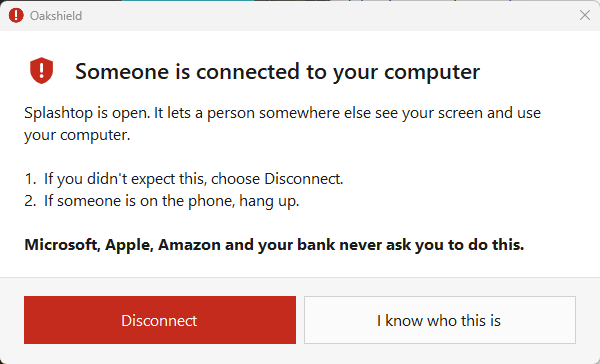
It runs quietly on a Windows 10 or 11 computer, and speaks up only when something is wrong.
When it does, it says what's happening in plain words and what to do next.
Programs scammers use to control a computer, like AnyDesk and TeamViewer, are blocked unless you or your family allow them. If someone does connect, one button disconnects them.
Those full-screen "your computer is infected, call this number" pages are fakes. Oakshield recognises them, says so, and closes them for you.
Some websites pretend to check you're human, then ask you to press keys and paste something. That installs a virus. Oakshield removes the harmful command before it can run.
Known scam pages and look-alikes of real banks and shops are blocked in Chrome, Edge and Brave, using lists updated every day.
When something serious happens, a family member you choose gets an email, a text or a phone notification, so someone can check in straight away.
New downloads are checked as they arrive, and the whole computer gets a quiet daily check. It works alongside Microsoft Defender, not instead of it.
If a payment fails, or you decide to stop paying, we don't take away the protection that keeps scammers out.
Only virus checks pause until the subscription is active again.
Pay monthly or yearly. Cancel any time from inside Oakshield, with no phone call and no fee.
One computer
$9.99 a month
or $99 a year
Choose IndividualUp to 10 computers
$24.99 a month
or $249 a year
Choose FamilyPayments are handled by Stripe; your card details never reach us. We email you before every yearly renewal.
Scammers pretend to be us too. Real Oakshield support will never call you out of the blue,
never ask for gift cards or passwords, and can always prove who they are with a check code.
On the computer you want to protect. It asks for Windows' permission once.
Who to call for help, and which family member to tell if something goes wrong.
Oakshield starts with Windows and keeps watch. Most days you won't notice it.